Quickstart
To try netdumplings you don’t need to write any of your own code. You can use the sample dumpling chefs and dumpling eaters instead, which is what we’ll do in this quickstart.
In this quickstart you’ll:
Start the dumpling hub
nd-hubStart a sniffer kitchen
nd-sniff(to sniff the network and create dumplings)Start a dumpling eater
nd-print(to display the dumplings)
Warning
You may need to run nd-sniff as root (or as an Adminstrator on
Windows), especially if you see errors from nd-sniff that you don’t see
with the other CLI tools. If you do this and are using a virtualenv, then
remember to source your virtualenv after you become root.
1. Dumpling hub
First start the dumpling hub:
$ nd-hub
You should see something like this:
2018-01-20T22:40:27.416 INFO Dumpling hub initiated; waiting for connections
2018-01-20T22:40:27.417 INFO Dumplings in: ws://localhost:11347  out: ws://localhost:11348
The hub is now waiting for WebSocket connections from one or more kitchens (to receive dumplings from) or eaters (to send dumplings to).
2. Sniffer kitchen
Now open another terminal and start a sniffer kitchen (you may need to do this as root, depending on your system):
$ nd-sniff
You should see something like this:
2018-01-20T22:41:15.991 INFO default_kitchen: Starting network sniffer process
2018-01-20T22:41:15.992 INFO default_kitchen: Interface: en0
2018-01-20T22:41:15.992 INFO default_kitchen: Starting dumpling emitter process
2018-01-20T22:41:15.993 INFO default_kitchen: Requested chefs: all
2018-01-20T22:41:15.993 INFO default_kitchen: Chef modules: netdumplings.dumplingchefs
2018-01-20T22:41:15.993 INFO default_kitchen: Filter: tcp or udp or arp
2018-01-20T22:41:15.993 INFO default_kitchen: Chef poke interval (secs): 5.0
2018-01-20T22:41:15.993 INFO default_kitchen: Registering netdumplings.dumplingchefs.ARPChef with kitchen
2018-01-20T22:41:15.994 INFO default_kitchen: Registering netdumplings.dumplingchefs.DNSLookupChef with kitchen
2018-01-20T22:41:15.994 INFO default_kitchen: Registering netdumplings.dumplingchefs.PacketCountChef with kitchen
2018-01-20T22:41:15.994 INFO default_kitchen: Starting interval poker thread
2018-01-20T22:41:15.994 INFO default_kitchen: Connecting to the dumpling hub at ws://localhost:11347
2018-01-20T22:41:15.995 INFO default_kitchen: Starting sniffer thread
The sniffer kitchen will default to passing all sniffed packets to the dumpling
chefs defined in the netdumplings.dumplingchefs module. This includes
ARPChef (which reports ARP traffic), DNSLookupChef (which reports DNS
lookups), and PacketCountChef (which counts packets by protocol).
The dumplings created by the chefs are automatically sent to the dumpling hub, which then forwards them on to any connected eaters.
You may need to specify an interface when starting the dumpling kitchen:
$ nd-sniff --interface en0
3. Dumpling eater
Now open a third terminal and start a sample eater. This eater will display all the dumplings generated by the dumpling chefs registered to the kitchen.
$ nd-print
You should see something like this:
Connected to nd-hub at ws://localhost:11348
Waiting for dumplings...

2018-01-20T14:42:11.040829 [interval] PacketCountChef from default_kitchen

{
    "packet_counts": {
        "ARP": 4,
        "Ethernet": 7052,
        "IP": 7048,
        "Raw": 7046,
        "TCP": 6,
        "UDP": 7042
    }
}
Note
You’ve now seen netdumplings at work. The network was sniffed by the
kitchen (nd-sniff), which passed all the sniffed packets to the
registered chefs. Those chefs produced dumplings which were
automatically sent to the hub (nd-hub) which forwarded them on to
the eater nd-print).
Additional dumpling eaters
netdumplings comes with two other dumpling eaters which can be used to monitor
nd-hub, called nd-hubstatus and nd-hubdetails.
nd-hubstatus continually prints summary status information from
nd-hub:
$ nd-hubstatus

nd-hub status from ws://localhost:11348
2018-01-20 14:44:52  uptime: 00:04:25  dumplings in: 107  out: 92  kitchens: 1  eaters: 1
nd-hubdetails displays the contents of a single system status dumpling:
$ nd-hubdetails

Connected to nd-hub at ws://localhost:11348
Waiting for a SystemStatus dumpling...

{
    "dumpling_eater_count": 1,
    "dumpling_eaters": [
        {
            "info_from_eater": {
                "eater_name": "detailseater"
            },
            "info_from_hub": {
                "host": "::1",
                "port": 60807
            }
        }
    ],
    "dumpling_kitchen_count": 1,
    "dumpling_kitchens": [
        {
            "info_from_hub": {
                "host": "::1",
                "port": 60786
            },
            "info_from_kitchen": {
                "chefs": [
                    "netdumplings.dumplingchefs.ARPChef",
                    "netdumplings.dumplingchefs.DNSLookupChef",
                    "netdumplings.dumplingchefs.PacketCountChef"
                ],
                "filter": "tcp or udp or arp",
                "interface": "en0",
                "kitchen_name": "default_kitchen",
                "poke_interval": 5.0
            }
        }
    ],
    "server_uptime": 275.232823,
    "total_dumplings_in": 111,
    "total_dumplings_out": 95
}
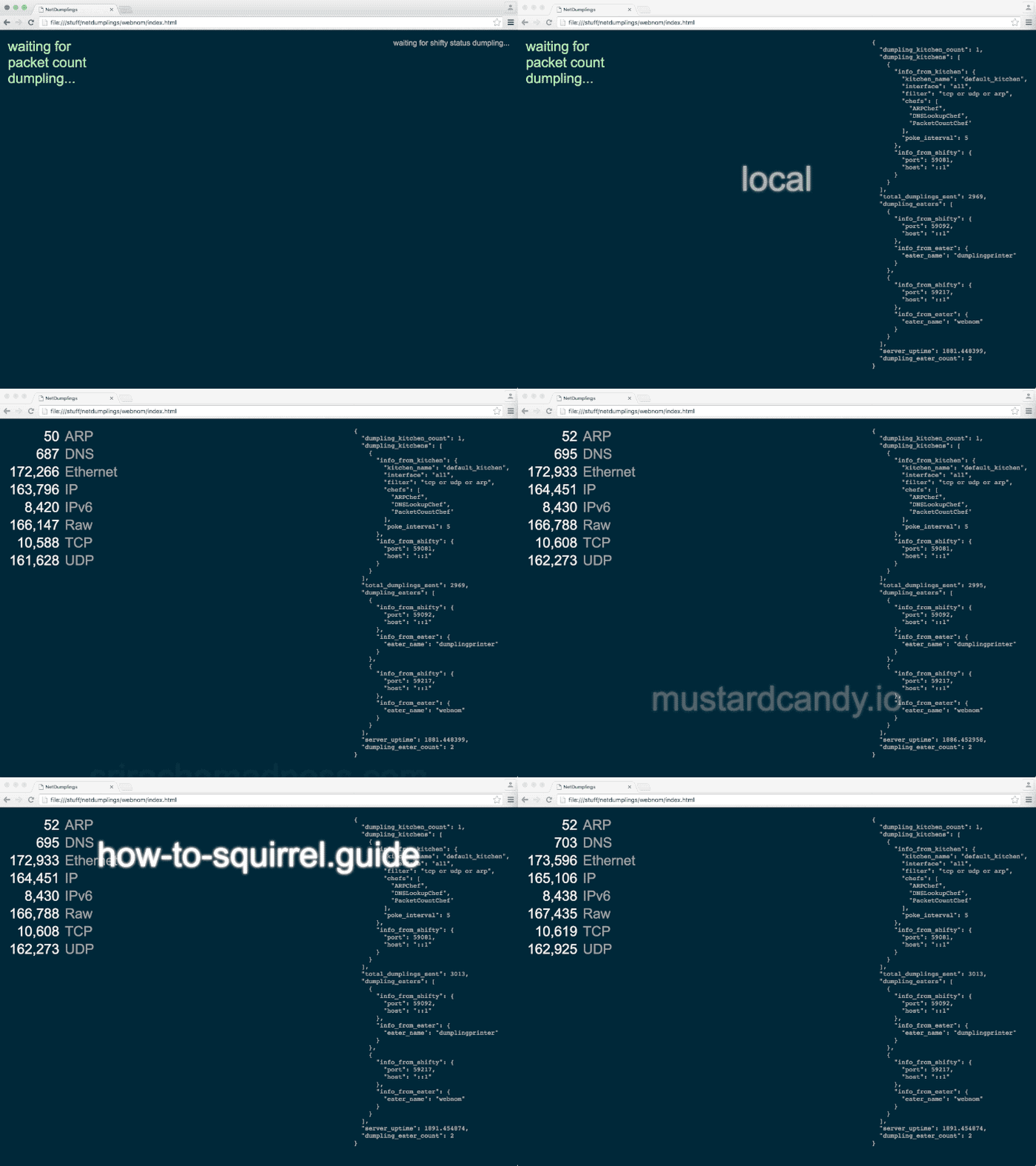
A Web browser dumpling eater
There’s also a small Web browser dumpling eater in the netdumplings source
repository. You can run it by copying the source code from GitHub and
loading it into a web browser. Or you can clone the entire netdumplings
repository and find the web eater in the netdumplings/webnom/ directory:
git clone https://github.com/mjoblin/netdumplings.git
It looks something like this:
Writing your own chefs and eaters
This quickstart showed you how to use netdumplings with the provided dumpling
chefs and eaters. However, to get the most use out of netdumplings you’ll be
writing your own chefs in Python (by subclassing DumplingChef) which
you register with one or more running instances of nd-sniff.
You’ll also write your own eaters (perhaps using the DumplingEater
helper class). Dumpling eaters are just WebSocket clients which receive JSON
dumpling payloads so you can also write them in any other language.